
Office Window
DeployedWhat it is
The TV in the basement shows an outdoor camera full-screen, like a window. A clock appears in the top-right corner. The lower-left corner shows a circular radar about 50 miles in diameter with the home position marked by a red dot. The lower right-hand corner displays the weather. The jukebox appears in the bottom center. New tracks appear briefly with the artwork and track details, then minimize to a simple line until the track finishes. When no track is playing, nothing is shown. Weather alerts move down from the top center, and one shortcut button changes the camera view to a three-hour radar loop.
Among the technical solutions used in the project were:
- Python
- mpv
- Raspberry Pi 4
- MediaMTX
- ffmpeg
- Jellyfin
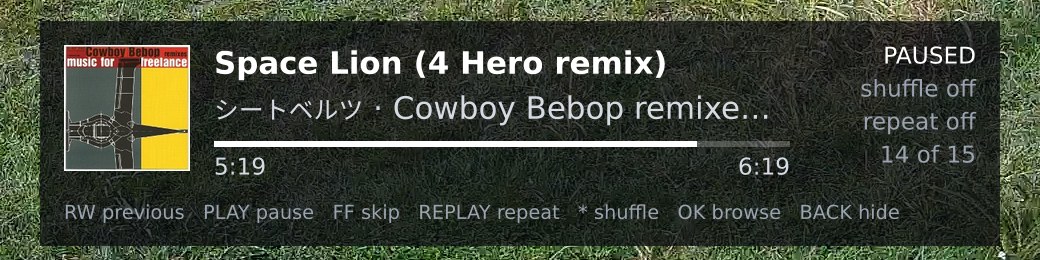

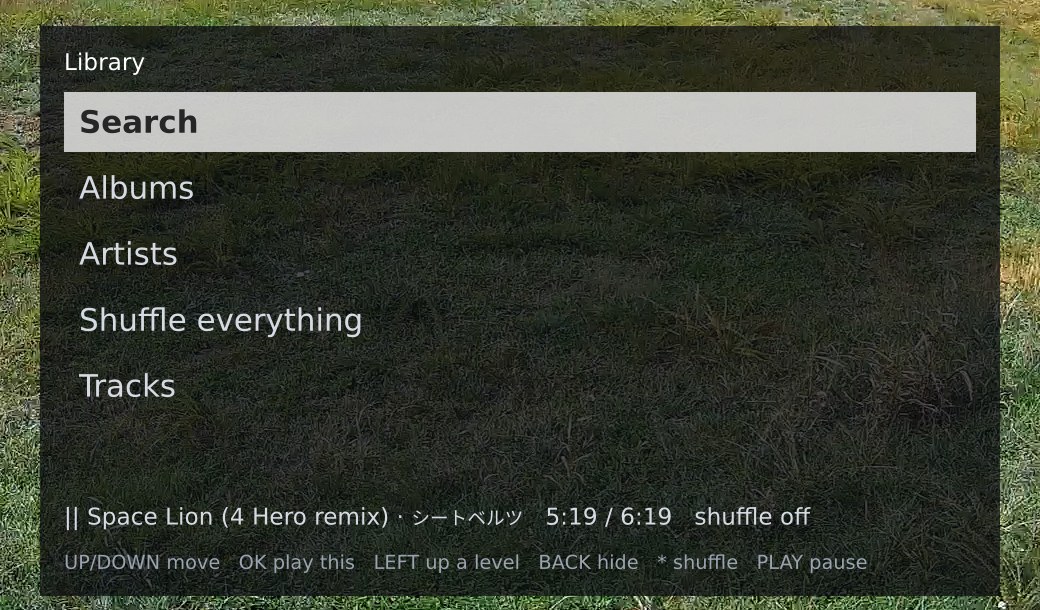
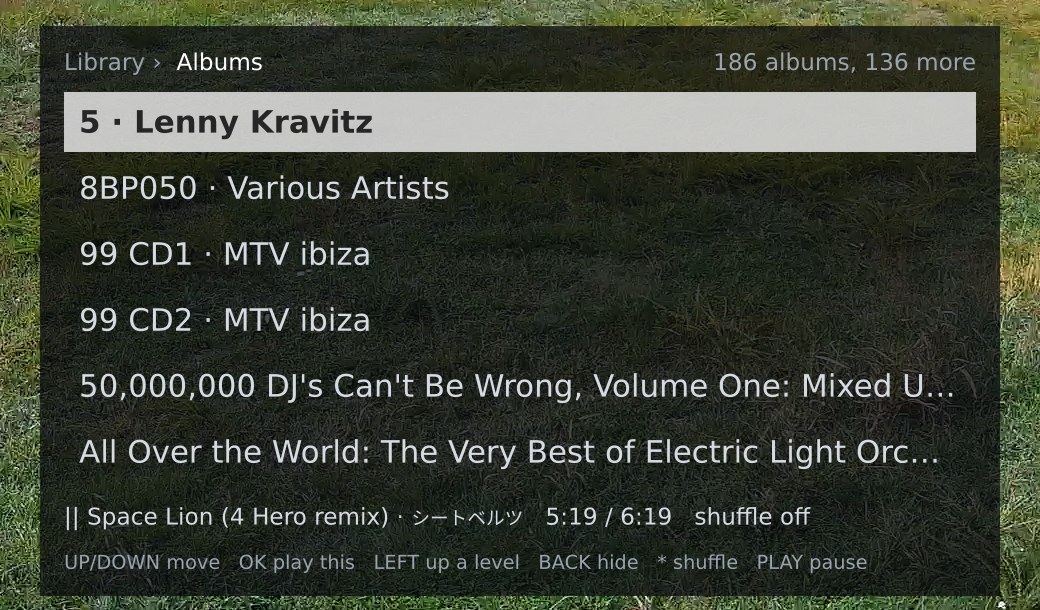
A Roku remote controls the TV. Home opens the library, OK plays, and the arrows change the volume or move through the lists; a Search row at the top of the library opens an on-screen keyboard. Since 2026-10-06, the box behind the TV has been a Raspberry Pi 4, which now runs the display locally and controls the camera and jukebox through the bridge. Before that, the Roku handled the display, camera, and jukebox path, which is why there is a Pi. The old path ran Roku remote to Roku channel to bridge. The new path runs Roku remote to Pi to bridge to camera and jukebox. This change leads into the next section: the Roku line.
The Roku line
Our initial setup was a Roku channel. MediaMTX on the bridge host takes the camera feed and serves it for Roku. The bridge also creates the radar image. The first camera we used was a eufy indoor cam aimed outdoors; its stream dropped every few minutes, and it had no local way to restart it. We therefore removed it and fitted an Amcrest PoE camera.
The next device to arrive was the jukebox, and it hit the Roku's hard limit: a channel can have only one media player; to make this work, we had to include the music in the camera stream. A service running on the bridge retrieves each track from Jellyfin, decodes it with ffmpeg, and combines it with the camera stream before publishing a second MediaMTX path. When no music is playing, it writes silence so the stream doesn't stall. There is still a three- to four-second lag after each key press because the Roku buffers HLS. We reduced the delay as much as possible, lowering it from about 5 seconds to 3 or 4. MediaMTX's low-latency HLS was not an option because the Roku Express cannot play it; the channel would reconnect every 5 seconds until we reversed the change. The service delivers audio from the most recent segment within one second of a command; the rest of the delay comes from the Roku's own buffering.
The worst part was the progress bar; it started moving as soon as Play was pressed, roughly seven seconds before the music actually started. To fix this, we used playback status from five seconds earlier and adjusted the elapsed time accordingly. This brought the bar's position closer to what we were hearing. Regarding Pause, instead of waiting for the stream to catch up, we muted the player immediately. It didn't eliminate the delay, but at least pressing Pause would stop the sound.
By that evening, we had given up on the Roku. We left the software version in its own repository and connected the Pi to the TV. This change leads into the Pi set-top.
The Pi set-top
We’re using a Raspberry Pi 4 Model B with 8 GB in an Argon ONE V2 case, running Raspberry Pi OS Lite (64-bit), booting from a 128 GB M.2 SATA SSD with no SD card in the slot. We put it on the IoT Wi-Fi, and the picture stuttered. On 2.4 GHz, it got about 0.8 Mbit/s from the bridge, compared with the camera's 4.5, and no buffer fixes that. It has been Ethernet since, with the radio off.
The Raspberry Pi 4 runs window.py and the mpv players; it includes radar, camera, music, weather conditions, alerts, and a Roku IR remote. Python, Pillow, ffmpeg, MediaMTX, and the jukebox service support it. mpv handles video, audio, and alert tones. The program displays the clock, weather, radar, and alerts; manages the music queue, library, and search; reads the remote; polls conditions and alerts; retries the bridge; and controls both players via JSON IPC. The Pi acts as the local controller, the bridge provides the camera, music, and radar data, and mpv renders the output.
The bridge host is the same unit that supplied the Roku and still does. It runs the camera and jukebox services, while the Pi has no credentials. The Pi accesses Jellyfin only through the jukebox service, and the bridge handles both services. The bridge provides the data and streams, while the Pi uses them and controls the TV. This arrangement keeps the bridge separate from the Pi's display role, so data flows from the bridge to the Pi.
The entire function is carried out by a single Python program called window.py. It starts two mpv players as child processes and controls them via JSON IPC sockets. The video player receives the camera feed directly from MediaMTX via RTSP and displays it through DRM/KMS without a desktop interface below it. The audio player plays one song at a time from the bridge's jukebox service; pause, seek, and skip are local commands, so each key action is processed immediately. The card updates based on the player's current position and pause status, so it stays in line with what is being heard. The panel displays the actual information rather than estimating based on what happened five seconds ago.
The video player itself draws everything on top of the picture. Text goes in as ASS subtitle events on a design grid scaled to the TV's 1920x1080 mode. We feed images, the radar circle, and the album art as raw files through mpv's overlay command. The panel copies the Roku channel's coordinates, fonts, and colors, so the two lines look the same on the TV.
On the bridge host, we maintained the three services together with all the credentials. MediaMTX draws one stream from the camera and allows the Pi only read access to it. The jukebox service handles Jellyfin login, the catalog, and the album art; it also proxies the tracks and forwards Range requests so mpv can seek. The Pi never connects to Jellyfin and doesn't have its own credentials. This keeps the bridge as the source of data and the Pi as the client.
The radar compositor also runs on the bridge. It rebuilds the circle every two minutes and the loop every five minutes. Because both versions use the same bridge, switching to the Pi didn’t change where any of that work happened. This carries into the radar loop.
The radar loop
Inspired by The Weather Channel's ‘Local on the 8s’. The local radar display consists of three hours' worth of frames, spaced five minutes apart and totaling 37 frames, shown on a darkened topographic map centered on home; along the bottom of the map, both the time of each frame and a countdown from T-2:55 to NOW are displayed. The compositor obtains frames from a time-enabled NEXRAD mosaic in Web Mercator format so the map isn't stretched. It stores each frame on disk so the view can refresh quickly, then encodes the frame sequence with ffmpeg and serves it with an ETag. We first tried NOAA's time-enabled mosaic, but its time window is irregular, ranging from two to four hours, so it cannot guarantee a three-hour loop, and we dropped it.
The Pi keeps its own copy of the file, so the view opens immediately, and navigation between frames using the fast-forward and rewind buttons runs locally. The loop is intentionally played back using software decoding, since moving backward by a frame is unreliable with the hardware decoder. When you leave the view, the camera reloads using hardware decoding again. The music continues to play in the background. Only the clock and any weather alert remain on the screen, displayed over the map.
Weather alerts and the sound problem
Window.py checks every two minutes for active alerts from the National Weather Service at the home location; the service is free, doesn't require an API key, and uses the coordinates to run the query.
Each alert appears in a toast that takes 0.3 seconds to slide down from the top of the screen; we haven't included a timer for it to disappear. The toast remains until you press OK or the alert itself ends, and no other key will acknowledge it. The stripe color depends on severity: red for Extreme, orange for Severe, yellow for Moderate, and blue for Minor.
When there’s more than one alert, the most severe comes first. Pressing OK acknowledges it and brings up the next one. Alerts you’ve acknowledged stay visible as badges until they end; those you haven’t acknowledged sound again every five minutes.
We kept the toast message brief since the full details are in the radar view, so there was no need for a separate alerts button. If you press OK in that place, a panel on the right-hand side will appear, listing all the active alerts with the most severe ones listed first, together with their times, areas, instructions, and the name of the event; you can scroll through the list using the Up and Down buttons, and either OK or Back closes the panel. Entering the radar view while a toast is up opens the panel automatically. Each alert's area is also shown on the map: polygon warnings are displayed according to their geometry, and county or zone alerts use the zone boundaries obtained once from the NWS and stored, with the severity color filled at 25 percent and the event name placed at the centroid. The bridge includes the map's bounding box in the loop, enabling the Pi to project the outlines onto the same map where the loop was originally drawn, keeping the two aligned. While acknowledged alerts are active, they continue to display.
We gave more thought to the identity than to the toast. Whenever the NWS issues an update, it sends a new message with a new ID, and the previous one vanishes from the feed, so relying on the ID would cause an alarm to sound with every update. Instead, window.py identifies each process by the VTEC string, the NWS's identifier for an event across all updates and cancellations; if that fails, it uses the reference chain, then the ID. If an update increases severity or urgency, it is considered an escalation and triggers again; otherwise, it is a revision and only refreshes the text.
An alert thread is closed when its end time passes, when a cancellation refers to it, or when it is missing from two consecutive polls. We keep the record for an additional six hours so a late update won't trigger the same alarm again.
The threads and their acknowledgments are saved to disk, so a restart won’t replay alerts you’ve already acknowledged.
Each alert has a sound corresponding to its severity level. We selected four tones from E2S's library, from low to high: a chime, an intermittent sound at 745 Hz, the 420 Hz Australian alert, and the 1 kHz general alarm for Extreme. The EAS attention signal is set aside and is not reproduced. The tones ran into a hardware limitation that affected how they played. The Pi's HDMI audio device accepts only the IEC958 subframe format, which ALSA's dmix cannot mix, so the device can never have two players using it at the same time. A tone therefore causes the music to stop, notes where it left off, and then plays through a temporary third instance of mpv with 500 ms of silence before it so that the TV's HDMI lock-in won't distort the start of the tone, after which it reloads the track at the same position with it paused so that the room remains silent until someone presses Play. If Play is pressed while the signal is playing, it will instead resume. Only one tone is played at a time, with 20 seconds between tones and 3 seconds when a more severe level is waiting.
It's a useful thing for home use, not an emergency broadcast channel. The Pi may be switched off, and the feed might lag.
The remote
The Roku Express comes with its own infrared remote, which the receiver
built into the Argon case detects. window.py reads each Linux input
device directly, without using any library, and rescans every 30 seconds
so that you can use a USB keyboard for testing and a virtual remote on
/dev/uinput for automated checks. The Roku remote uses NEC
extended, and a kernel keymap maps its buttons to normal keys. This took
one hour on 2026-10-07 for two reasons: the keymap tool is a separate
package on Debian Trixie, and the receiver only enables RC-6 decoding by
default. Therefore, the NEC frames arrived in their original form and
were not decoded until the keymap loaded a protocol named exactly
nec. If the protocol is named necx, the tool
looks for a plugin and, as a result, switches NEC off.
We intended to send the volume controls to the TV via HDMI-CEC; however, while the TV responds to CEC commands, it ignores volume and mute signals from the active source. Therefore, the arrow buttons adjust the music player's software volume in 3-unit increments, showing a "Volume N" bar at the top for 1.5 seconds and retaining the setting after a restart. The tones have their individual volume. Although the TV's own remote is controlled through CEC, we haven't tested it because that TV doesn't have a remote.

Coming back without hands
The house power failed at random, and this proved to be a better test than any we could have devised: the Pi, the camera, and the network restarted automatically. The bridge host did not and remained dark. Dave pressed the power button; the BIOS now powers the machine on after an AC power loss. Since the Pi's case has a jumper set up to keep it running continuously, it boots as soon as power is available.
The TV showed a console login prompt because the video player, having nothing to play, had freed up the screen. Window.py now maintains the player window open even when no content is loaded, which means that during a bridge outage the screen displays black together with the clock and the message 'camera unavailable / waiting for the bridge'; all the other elements stay on the screen, and the camera tries to reconnect every five seconds. A player that exits restarts within two seconds; if window.py itself exits, systemd restarts it after five seconds.
The music catalog catches up within a minute of the bridge. While the jukebox doesn't respond, the Pi works from its saved copy and asks again every minute, then every hour once the bridge is back. It used to wait 20 minutes between attempts, which left search and shuffle on the saved list for that long after the bridge returned. The library pages ask the bridge directly, so they come back the moment it does.
Small things that took a day
While listening to music, we noticed the music dimmed in and out during playback. Nothing in the chain alters the level, so we were confused as to the cause. We put an EBU R128 loudness meter in the audio player's filter chain to log short-term, momentary, and integrated loudness every 30 seconds alongside the volume setting and the track.
The Pi's output stayed steady through a drop Dave heard, so the cause was further down the chain. Dave checked the TV settings and saw that DTS TruVolume was on, a slow automatic volume control that reduces output after loud sections. We switched it off, after which the quiet introductory parts are simply the music itself; for example, a trance intro at -31 LUFS stays in place even after a Cher track at -8.
A Japanese artist name drew as a row of empty boxes. The Pi had only DejaVu, which has no CJK glyphs. Noto Sans CJK fixed the glyphs and changed the widths because libass scales a fallback font so its line height corresponds to the requested size, making a kana or ideograph about 0.69 of the font size wide. window.py measures East Asian wide characters that way now, so a cut line still ends in an ellipsis where it should.
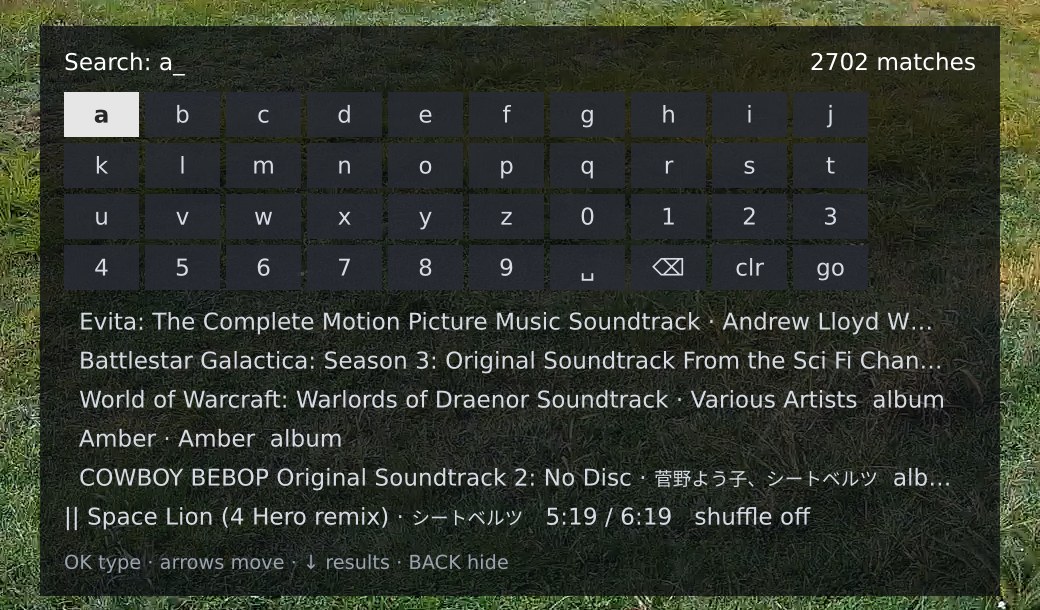
Library search came next, a Netflix-style on-screen keyboard with results drawn from the catalog already in memory, every track with its album and artist, so they change with every key, and no request leaves the Pi. Albums whose name matches, then artists, then tracks, at most 60 rows with the full count on the right.
Where it stands
It has run on the basement office TV since the night it replaced the Roku. Dave uses it daily because the basement office has no window, and he feels disconnected from the rest of the world without it.